
Queue management
Queue management that belongs on your screens.
Run service queues while keeping display space available for information, promotions and other signage content.
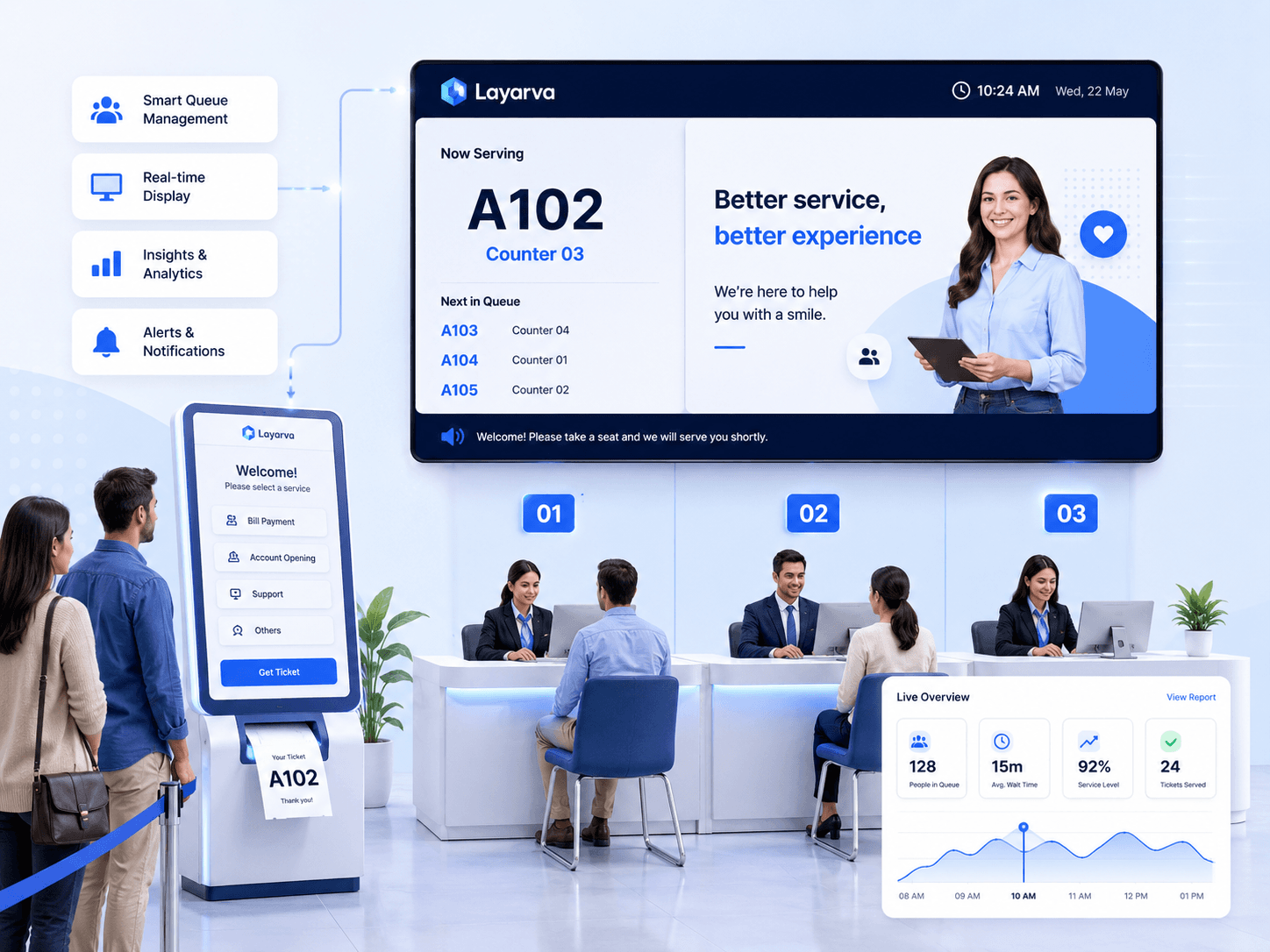
The flow
Kiosk to counter, in one system.
- 1
Kiosk
A visitor chooses a service and takes a ticket, printed or on screen.
- 2
Queue engine
The ticket enters the right service queue and waits its turn.
- 3
Operator
Staff call next, recall, start, complete or mark a no show from the counter.
- 4
Display
The number appears on the queue display, with a chime and text-to-speech announcement.
The difference
Your queue screen is still a digital signage screen.
The queue display is designed in Layarva Studio, on the same canvas as every other screen. That means the space around the number is yours — for promotions, health information, event schedules or whatever the room needs. Turn waiting time into communication time.
A-025
Counter 3
Operator
Everything the counter needs, and nothing it does not.
The operator console is a working tool for someone who is also talking to a visitor. Call next, recall a number that did not answer, start and complete a service, or mark a no show.
- Call next and recall
- Start, complete, no show
- Multiple counters per service
- Multi-service in one Queue Unit

Kiosk
A ticket without a queue to get one.
The kiosk station shows the services on offer and issues a ticket for the one the visitor picks. Where a thermal printer is connected, the ticket is printed and can be reprinted.
- Multi-service selection
- Issue, print and reprint
- Designed in Studio, like any other screen

Multi-service
One location, several queues.
Most places do not have one queue. They have registration, then pharmacy, then the cashier — and a visitor may pass through more than one of them.
Hospital
Registration, pharmacy, cashier, laboratory.
Bank
Customer service, teller, priority service.
Government office
Registration, verification, document collection.
Queue capability
A Queue Unit is a Queue Unit.
Queue capability is not rationed by tier. Plans differ in how many Queue Units they include, not in what a Unit can do.
| Feature | Starter + add-on | Business | Premium | Queue Only |
|---|---|---|---|---|
| Queue Units | Add-on | 1 included | 3 included | 1 included |
| Queue display designer | Included | Included | Included | Included |
| Full Studio Canvas | Included | Included | Included | Included |
| Kiosk station | Included | Included | Included | Included |
| Multi-service queue | Included | Included | Included | Included |
| Issue ticket | Included | Included | Included | Included |
| Print and reprint | Included | Included | Included | Included |
| Call next | Included | Included | Included | Included |
| Recall | Included | Included | Included | Included |
| Start and complete | Included | Included | Included | Included |
| No show | Included | Included | Included | Included |
| Chime | Included | Included | Included | Included |
| Text-to-speech | Included | Included | Included | Included |
| Thermal printer | Included | Included | Included | Included |
| Queue monitoring | Included | Included | Included | Included |
| Queue reports | Included | Included | Included | Included |
Where it fits
Queues that already exist.
Healthcare
Clinics, hospitals, laboratories, pharmacies.
Public service
Counters where citizens wait for a document or a decision.
Financial service
Banks, cooperatives, finance offices.
Retail
Customer service, pickup counters, service centres.
Automotive
Workshops and service counters.
Education
Registration, student services, administration.
Questions
Do I need a separate plan for the queue?
Not necessarily. Business includes one Queue Unit and Premium includes three. Starter can add a Queue Unit as an add-on. If you only need the queue and no signage network, Queue Only is a plan on its own.
Can the queue display show other content?
That is the point of it. The display is a Studio layout, so the queue panel is one region on a canvas you design — the rest can carry promotions, announcements, video or a ticker.
Does it announce the number out loud?
Yes — a chime and text-to-speech announcement accompany a call, and both are part of every Queue Unit.
Can it print tickets?
Where a supported thermal printer is connected to the kiosk, tickets can be printed and reprinted. Check the device compatibility page before buying hardware.